
As an Amazon Associate, LookItAllUp earns from qualifying purchases.
If you're buying your first monitor, or your first upgrade from a laptop screen, this guide is for you. Our headline pick is the Dell 24 Plus (S2425HSM), which combines a stand you can raise, tilt, swivel and rotate with built-in speakers and a setup buyers say needs no tools. If you want something cheaper, sharper or portable, there's a clear pick for each below.
Buyer's guide
Before you buy: what actually matters
Monitor listings are full of numbers, but only a handful really affect a beginner's day-to-day experience. Focus on these first.
1Match size to resolution
At 22 to 24 inches, Full HD (1920x1080) looks sharp. At 27 inches, 4K makes text noticeably crisper and gives you more room for windows.
2Refresh rate means smoothness
Refresh rate, measured in Hz, is how many times per second the picture updates. 60Hz is fine for work; 100Hz to 144Hz makes scrolling and games feel smoother.
3Check your cables and ports
Make sure your computer has a matching port, usually HDMI, DisplayPort or USB-C. Not every cable is included, and USB-C video only works if your laptop supports it.
4Don't ignore the stand
A stand that adjusts height lets you put the screen at eye level, which is easier on your neck. Tilt-only stands are more limited.
5Eye comfort and speakers
Blue-light reduction and flicker-free screens help during long sessions. Built-in speakers save buying extras, though quality varies.
Our top picks
Tool-free setup, built-in speakers and a stand that adjusts in height, tilt, swivel and pivot make it comfortable from day one.
See it on AmazonIts 27-inch 4K IPS screen with 99% sRGB color has room for serious work as your needs expand.
See it on AmazonBuyers say it stays bright with no glare from room lighting, and IPS keeps colors consistent from any angle.
See it on Amazon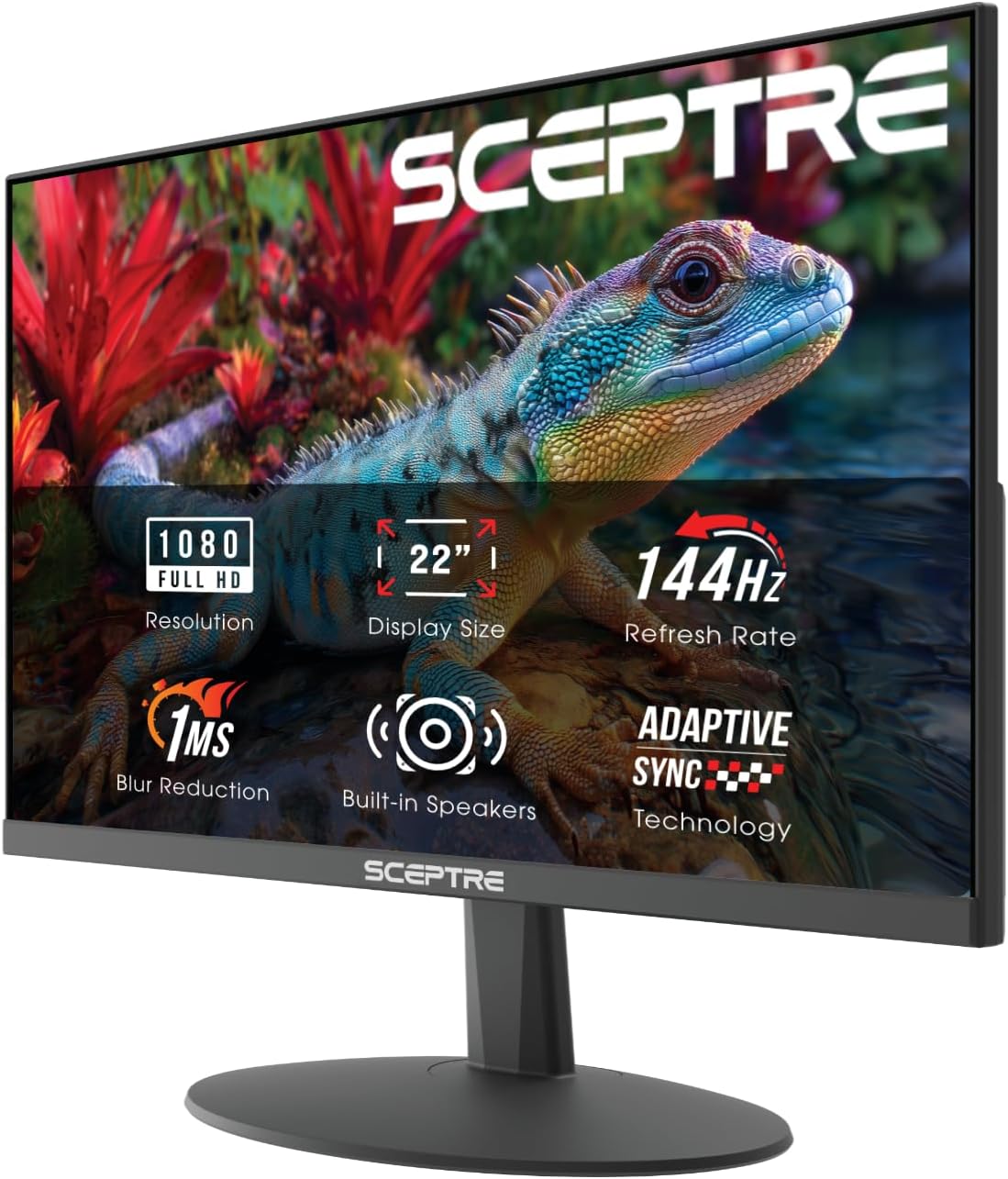
Best for compact gaming desks#1 best seller
Sceptre 22-Inch 144Hz Monitor
Sceptre New 22-Inch Gaming Monitor, FHD 1080p, Up to 144Hz, HDMI, DisplayPort, Built-in Speakers, Machine Black (E225W-FW144 Series, 2026)
This is the number one seller in the category, and it's easy to see why newcomers pick it. The 22-inch screen suits smaller desks, and the 144Hz refresh rate makes games and scrolling look smoother than a standard 60Hz display. Built-in speakers mean you can get sound without buying anything extra, and Blue-Light Shift helps reduce eye strain during long sessions.
Buyers describe the picture as crystal clear and the setup as easy. Opinions on the speakers are split, with some happy and others finding them weak, so plan on headphones if audio matters. Also note that a DisplayPort cable isn't in the box; HDMI works too if that's what you have.
What we like
- Smooth 144Hz motion for gaming
- Compact 22-inch size fits small desks
- Built-in speakers and blue-light reduction
- Buyers report easy setup
Keep in mind
- Speaker quality gets mixed feedback
- DisplayPort cable not included
Best for: Beginner gamers with a small desk who want smooth 144Hz play in a compact screen.

Best glare-free everyday screen#2 best seller
Dell SE2426H 24-Inch
Dell 24 Monitor - SE2426H - 23.8-inch FHD (1920x1080) 144Hz 1ms Display, in-Plane Switching (IPS) Technology, AMD FreeSync™, TÜV 3-Star 2X HDMI, Tilt
Dell's SE2426H is a straightforward 23.8-inch Full HD monitor that reviewers say handles both work and gaming well. Customers particularly mention its brightness and the lack of glare from room lighting, which helps if your desk sits near a window or under overhead lights.
It uses an IPS panel, which keeps colors consistent even when you look from an angle, and runs at 144Hz for smooth motion. TÜV 3-star eye comfort certification and two HDMI ports round out a monitor that's easy to plug in and forget about. The stand is listed with tilt adjustment only, so you can't raise or lower it.
What we like
- Buyers report no glare from room lighting
- IPS panel with wide, consistent viewing angles
- 144Hz with AMD FreeSync
- Two HDMI ports
Keep in mind
- Stand listed as tilt-only, no height adjustment
Best for: First-time buyers who want a bright, glare-resistant 24-inch screen for mixed work and play.

Best for laptops on the go#3 best seller
MNN 15.6" Portable Monitor
MNN 15.6" FHD 60Hz Portable Monitor USB-C HDMI IPS HDR Gaming Laptop
This 15.6-inch portable display slips into a backpack alongside a laptop, according to buyers, making it a second screen you can take to class, the office or a hotel room. A single USB-C cable can carry both power and picture, and customers say it works right out of the box.
The catch for beginners: your laptop's USB-C port must support video output (listed as Thunderbolt 3 or USB-C DP Alt Mode). Check your device's specs before ordering, or use the HDMI option. It runs at 60Hz, so it's built for productivity and casual viewing rather than fast competitive gaming.
What we like
- Light and slim enough for a backpack
- One USB-C cable for power and video
- Works with laptops, consoles and some phones
- Portrait and extended display modes
Keep in mind
- USB-C video only works if your device supports it
- 60Hz, not aimed at fast gaming
- Glossy screen
Best for: Students and travelers who want a second screen they can carry with their laptop.

Best for long reading sessions#4 best seller
Philips 241V8LB 24-Inch
Philips 24 Inch Computer Monitor FHD 100Hz VA VESA Flicker-Free, 241V8LB
Philips built this 23.8-inch monitor with office workers in mind. Its EasyRead mode gives a more paper-like look for long documents, and the screen is flicker-free, both helpful if you stare at text all day. The VA panel is designed for deeper blacks and brighter whites, and a 100Hz refresh rate adds a little extra smoothness over basic screens.
Buyers call it plug-and-play and note it connects well with MacBooks, and the nearly frameless design makes it look bigger than it is. Feedback on color and brightness is mixed, with some finding it washed out, and some buyers wish the stand tilted more.
What we like
- EasyRead mode for documents
- Flicker-free screen
- Plug-and-play, works with MacBooks
- Slim bezels suit dual-monitor setups
Keep in mind
- Mixed reports on color and brightness
- Some buyers find stand adjustment limited
Best for: Home office workers who read and write on screen for hours and want a simple plug-and-play setup.

Sharpest screen to grow into#5 best seller
Dell 27 Plus 4K S2725QS
Dell 27 Monitor S2725QS, 4K UHD IPS, 120Hz, 5ms, FreeSync Premium
If you think you'll spend a lot of time on this monitor, the 27-inch 4K Dell is the one to grow into. 4K packs in far more detail than Full HD, so text looks crisper and you can fit more windows side by side. Customers praise it for work and note it pairs well with a Mac Mini.
The IPS panel covers 99% sRGB for accurate color, refresh goes up to 120Hz, and reviewers say the built-in speakers are surprisingly loud. ComfortView Plus cuts blue light without dulling color. Most buyers report no problems, but some say their unit failed within six months, so keep your receipt handy.
What we like
- Sharp 4K detail on a 27-inch screen
- Accurate color with 99% sRGB
- Up to 120Hz with FreeSync Premium
- Speakers reviewers call loud and clear
Keep in mind
- Some reports of units failing within six months
- Larger screen needs more desk space
Best for: Beginners who want one monitor for years of work, photos and video without needing to upgrade.

Most adjustable all-rounder#6 best seller
Dell 24 Plus S2425HSM
Dell 24 Plus Monitor - S2425HSM - 23.8-inch FHD (1920x1080) 144Hz 1ms Display, 2 x 3W Speakers, HDMI Connectivity, Height/Tilt/Pivot/Swivel Adjustability, AMD FreeSync - Ash White
The S2425HSM is the most forgiving choice here because it adapts to you. The stand adjusts for height, tilt, swivel and pivot, so you can set it at eye level instead of hunching, and one buyer notes assembly needs no tools. That flexibility is rare among beginner-friendly 24-inch screens.
You also get dual 3W speakers, a 144Hz refresh rate for smooth motion and TÜV 4-star eye comfort certification. Customers describe the text as crisp and the picture as outstanding, and many like the ash white finish.
What we like
- Height, tilt, swivel and pivot adjustment
- Tool-free setup according to buyers
- Dual 3W built-in speakers
- 144Hz with TÜV 4-star eye comfort
Keep in mind
- Full HD is less sharp than 4K for detailed work
- HDMI is the listed connection type
Best for: Anyone setting up their first desk who wants comfort, sound and smooth motion in one easy package.
Frequently asked questions
What does 144Hz actually mean, and do I need it?
It means the screen refreshes 144 times per second, making motion look smoother than a 60Hz screen. It's most noticeable in games and fast scrolling. For documents and browsing, a 60Hz or 100Hz screen like the MNN portable or Philips works fine.
What's the difference between IPS and VA panels?
IPS panels, used by the Dell models and MNN portable, are known for accurate color that stays consistent from different angles. VA panels, like the Philips, aim for deeper blacks and stronger contrast. Both are fine for beginners.
Will a portable monitor work with my laptop over USB-C?
Only if your laptop's USB-C port supports video, listed as Thunderbolt 3 or USB-C DP Alt Mode for the MNN. If not, you can connect via HDMI instead. Check your laptop's specs before buying.
Do I need separate speakers?
Not necessarily. The Sceptre and both Dell Plus models have built-in speakers, and reviewers call the 4K Dell's speakers loud. The Sceptre's speakers get mixed reviews, so headphones may be better for music or games.
Is 4K worth it for a first monitor?
On a 27-inch screen, 4K gives noticeably sharper text and more workspace, which helps for work and photos. On 22 to 24 inch screens, Full HD already looks crisp, so it's a sensible way to keep things simple.
How we chose these
We started from the top 6 products on Amazon's Best Seller list for Monitors (as of November 8, 2026) and wrote this Best for Beginners guide, with AI assistance, from their product details and what customers say in their reviews. We haven't tested these products ourselves, and no product or position is paid for. Rankings and availability change, so check Amazon for the latest details.
The verdict
For most first-time buyers, the Dell 24 Plus (S2425HSM) is the one to get. Its fully adjustable stand, tool-free setup, built-in speakers and smooth 144Hz screen remove the usual beginner headaches in one go. Choose the Dell SE2426H if you want a bright, glare-resistant screen without the extras, the 27-inch 4K Dell if you want room to grow, or the MNN portable if your workspace moves with you.
Our top pick: Dell 24 Plus S2425HSM
Check today's price on Amazon